HOME ASSISTANT, IN A NEW DIMENSION
Your home.
In your hands.
Upload your floor plan. Let AI help build your 3D home. Control every device right where it belongs.
Free & open source · Public beta
Preparing your demo home…
Go ahead. Turn off a light.Click a lamp. Drag to look around.
From floor plan to living 3D home
The idea of a 3D home dashboard isn’t new. The head start is. AI takes on the painstaking first pass, so you can review and refine instead of rebuilding every room by hand.
📐 Upload your floor plan
Image, PDF, photo or paste from the clipboard. Draw a room yourself if you prefer.
🤖 AI reads the rooms
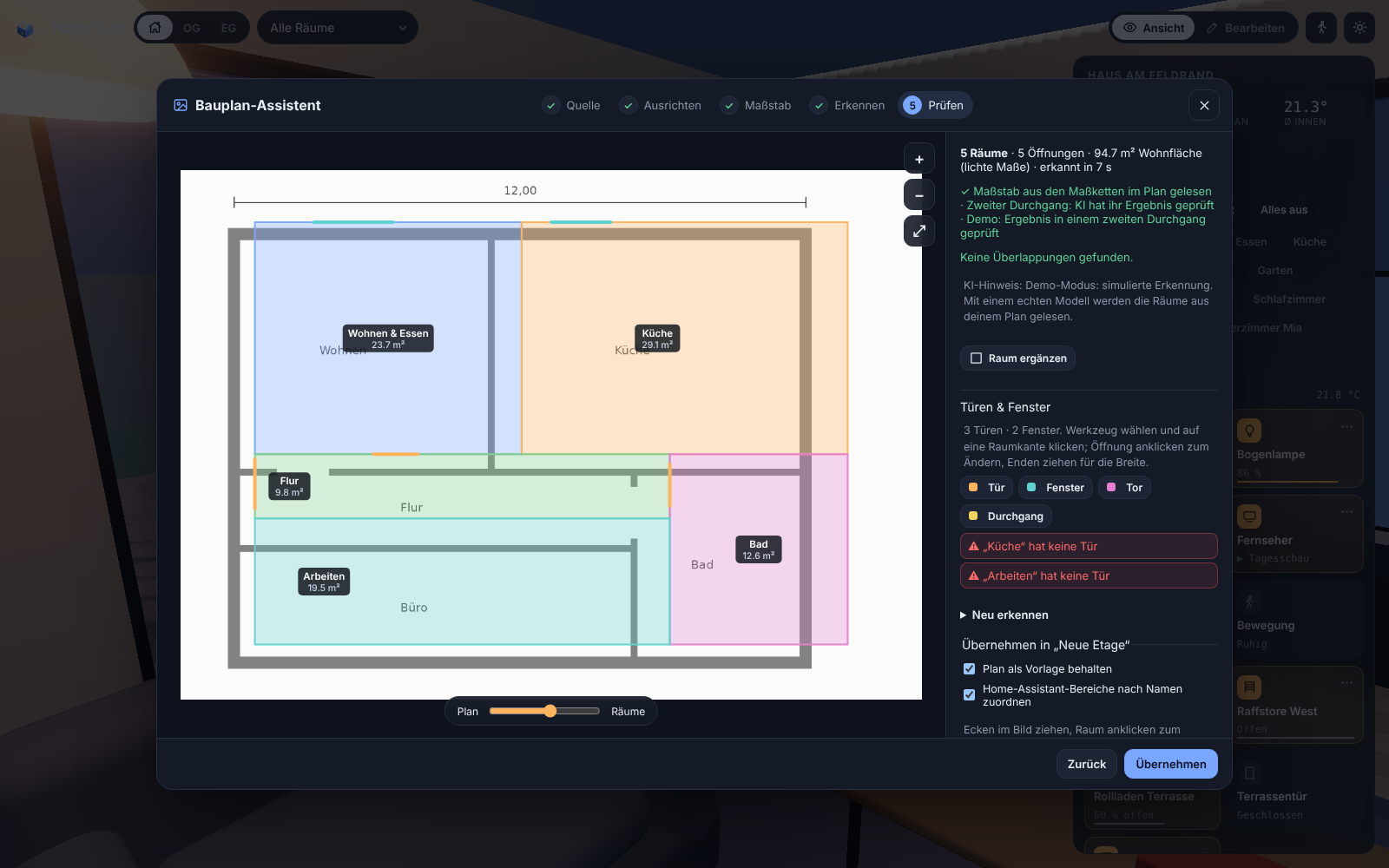
Walls, rooms, doors, windows and dimensions are read from the plan and checked against the printed m².
🏠 Control it in 3D
Rooms map to your Home Assistant areas. Place lights, blinds, sensors and cameras — and use them.
A home you recognise.
Devices you can reach.
A dashboard that feels like your home, not like a spreadsheet of switches.
Live devices
Lights glow in their colour, blinds and garage doors move, windows show when they're open. Tap to toggle, long-press for details.
Real sun & shadows
Sun position from your location and time, including PV panels that light up with your solar output.
Roofs, storeys, garden
Gable, hip or flat roofs, several roofs for garage, carport or garden house, dormers and roof windows.
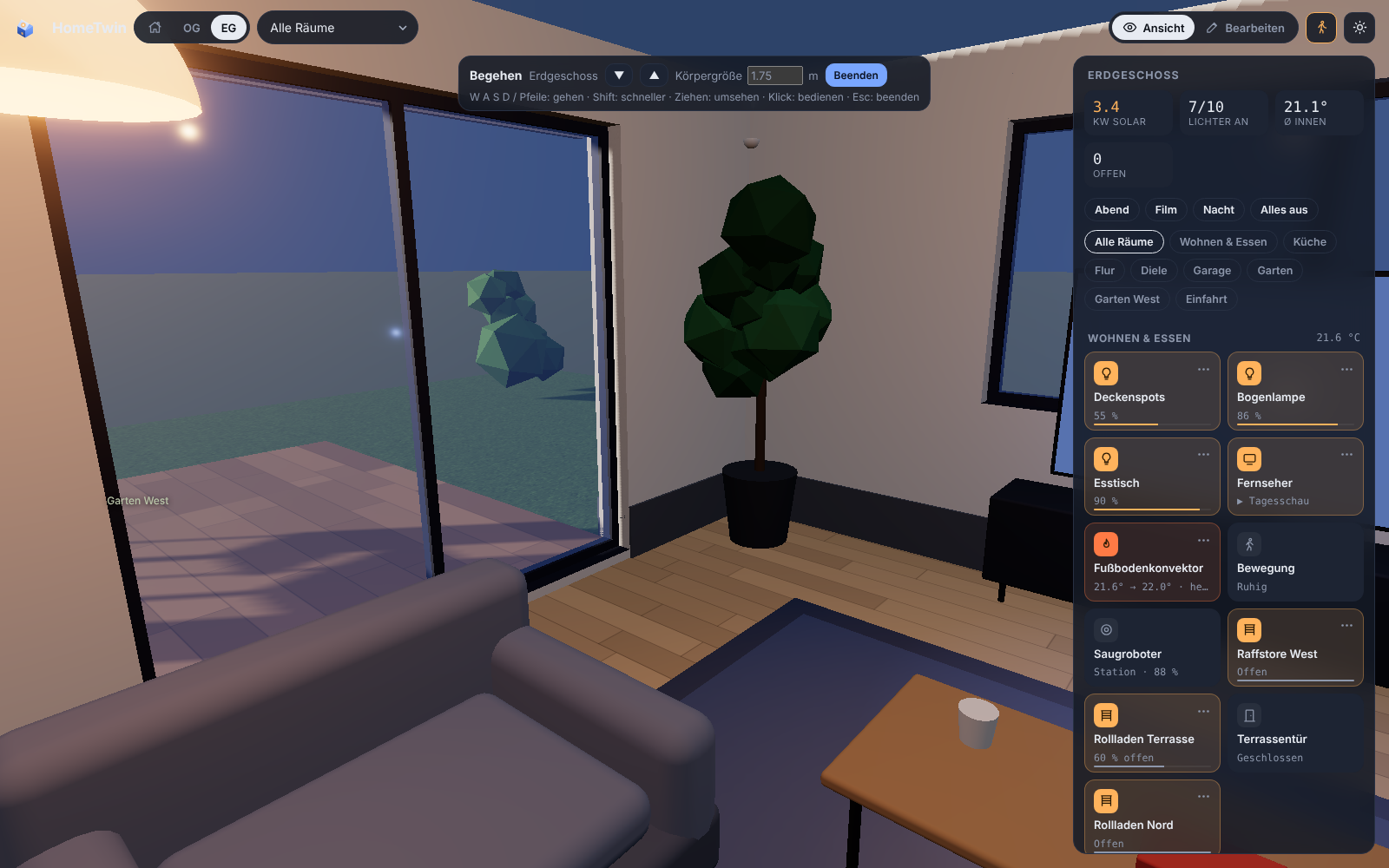
Walk through
Set your body height and walk through your rooms in first person — operate and rearrange things on the way.
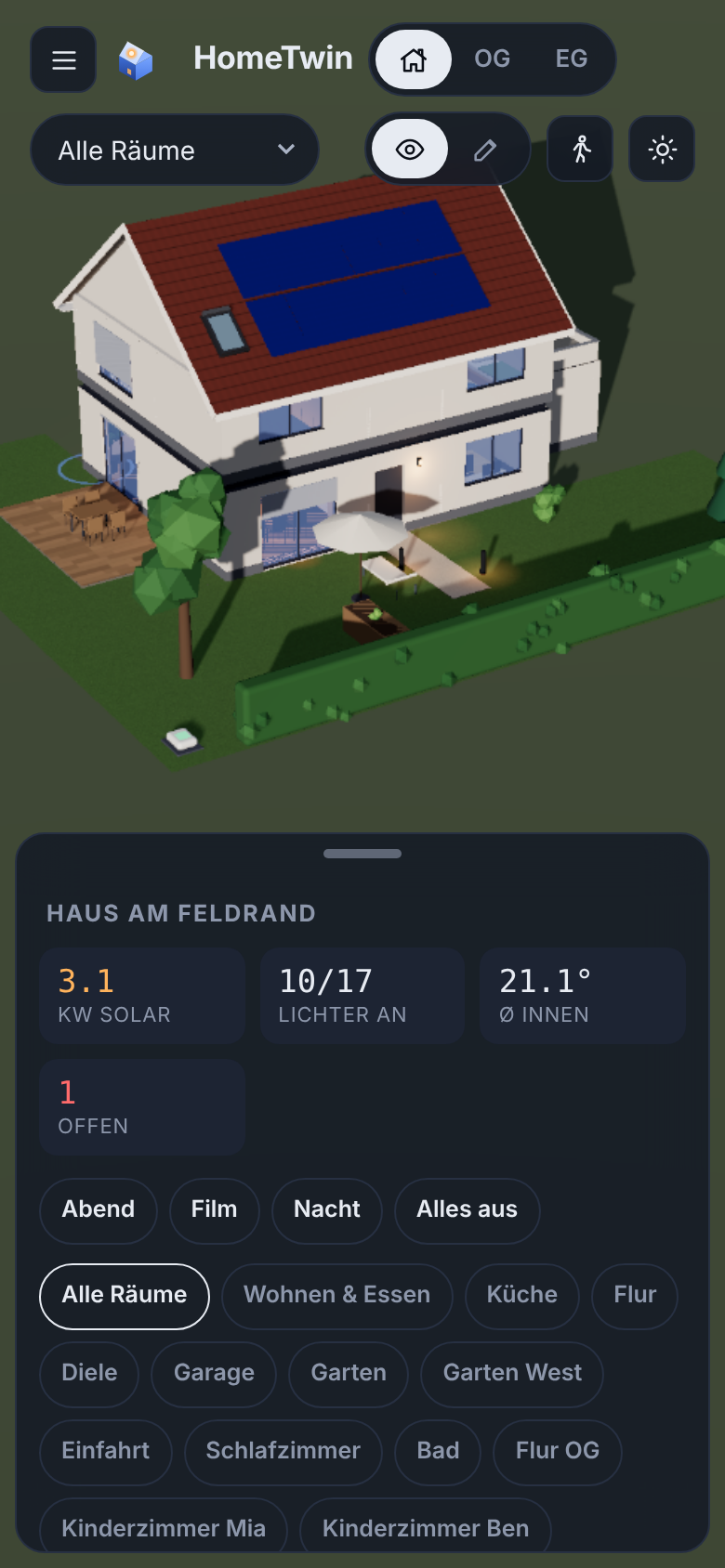
Made for phones too
Bottom sheet controls, room picker, touch gestures and a performance mode for tablets and wall panels.
Growing object library
Furniture, lamps, radiators, instruments — modelled from real dimensions by the community and updated live.
Your floor plan does
the heavy lifting.
In our own test, a real architect's plan with 12 rooms was read in about two minutes — rooms, doors and windows, with the scale taken from the printed dimension chains. Review the scale and dimensions before you continue; you can set the scale manually when the plan needs it.
- Dimension chains set the scale automatically
- Second pass: the AI checks its own result on an overlay
- Review step with area warnings, drag corners, add doors & windows by click
- Storeys, stairs and roof in one guided flow — then the walls rise
Pick a room, see everything in it
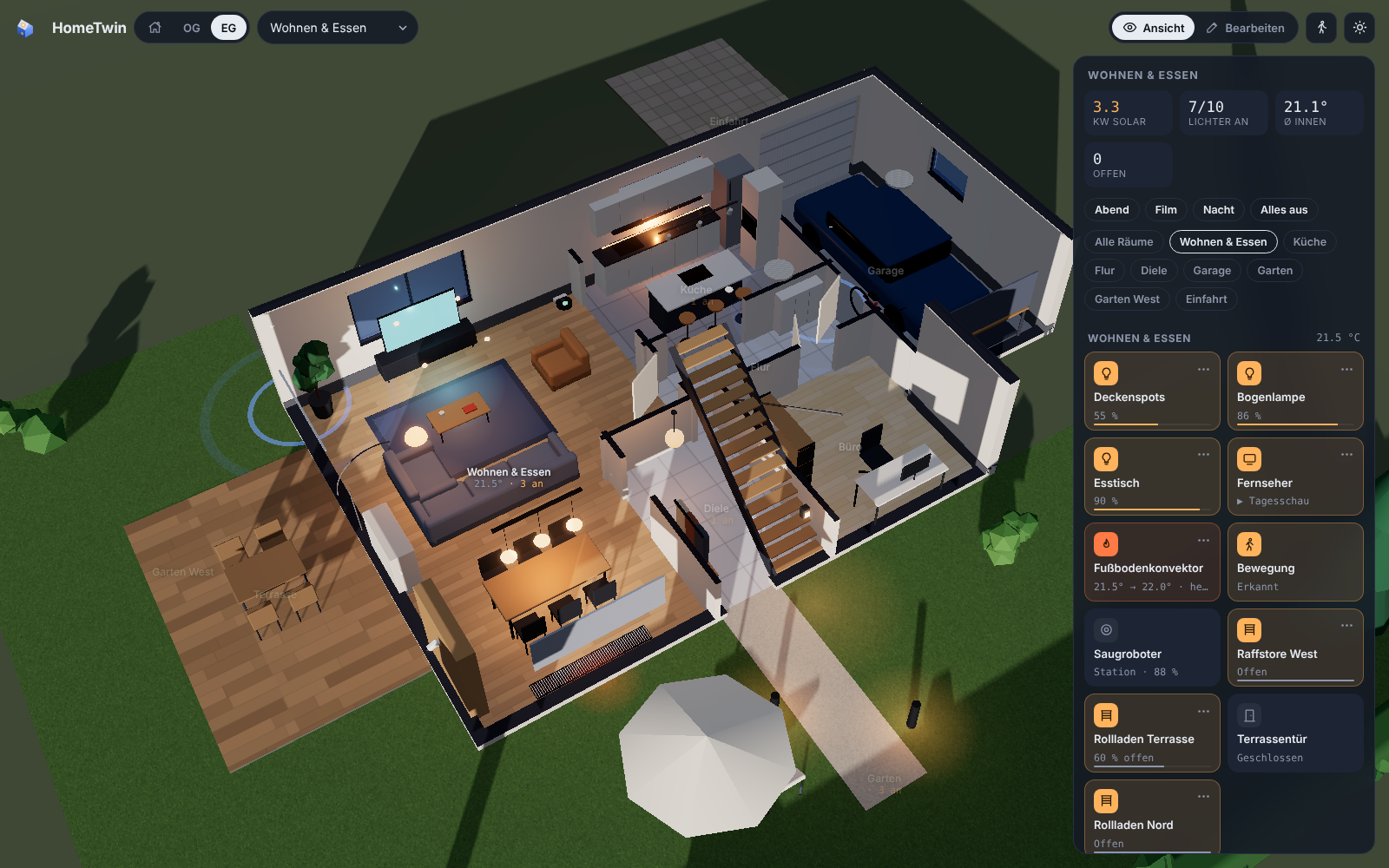
Choose a room and HomeTwin shows just that storey from above, with all its devices at hand. Scenes, temperatures, open windows and solar output at a glance.
Built by the community
Every object is a small recipe of shapes with real dimensions. New objects appear here — and in your HomeTwin panel — as soon as they are merged.
Missing your object? Contribute it.
Loading library …
Got some tokens to spare?
Put them to work for the community. Look around your home: what furniture or devices are missing from HomeTwin? Grab some product photos and use our contribution guide with Opus 5.5 or a comparably capable model. Bring a whole room’s collection if you like. Let’s make HomeTwin better together.
Contributing an object doesn't need 3D skills. Give your coding agent — Claude, Codex or any agent that supports skills — the file skills/add-object/SKILL.md and a product name or photo. It researches the dimensions, models the object, renders a preview, asks you to confirm and opens the pull request.
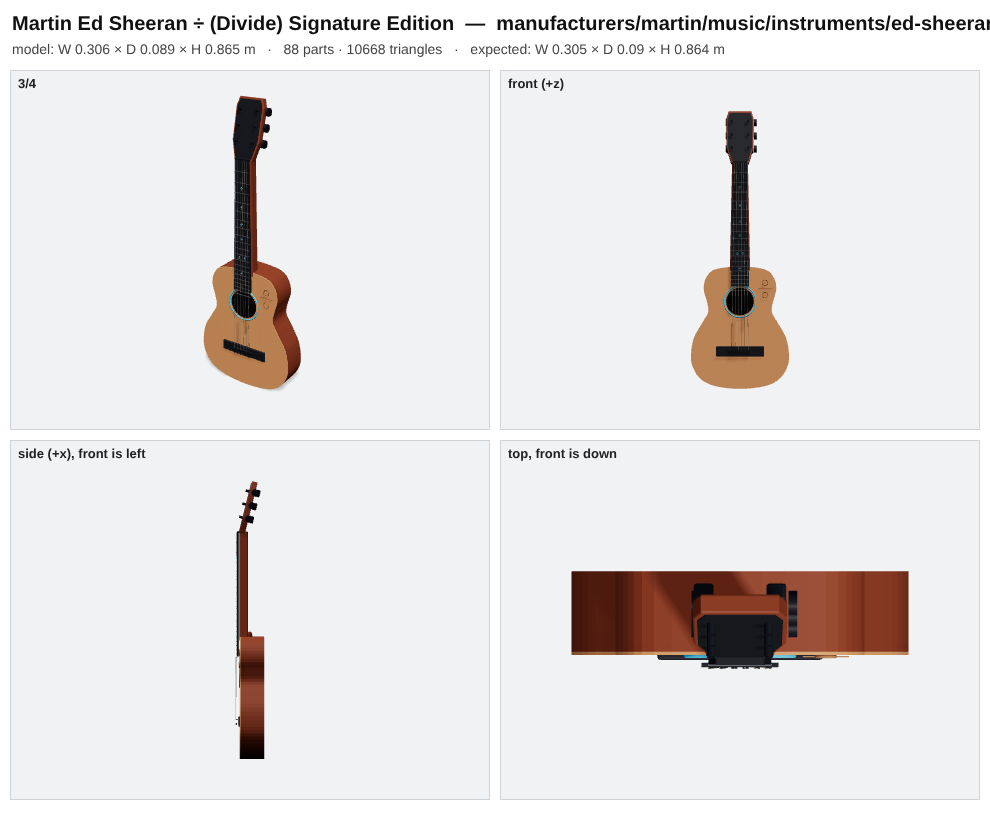
- One photo → a Martin Ed Sheeran ÷ guitar with 20 frets at their real positions, inlays and rosette — in about 5 minutes
- Look around your home: what's missing in the gallery? Your sofa, lamp, fridge, wallbox?
- Bring a collection: bundle the furniture and devices from a room in one pull request
No subscription.
Just your home.
HomeTwin is a community project built for people who want their home to feel like their home—even on a screen.
The code is free under MIT. Optional AI providers may charge for usage. You can also build your plan by hand.
Explore the source on GitHub ↗Up and running in a few clicks
- HACS → ⋮ → Custom repositories → add knaackee/hometwin as Integration
- Install HomeTwin, restart Home Assistant
- Settings → Devices & services → Add integration → HomeTwin
- Open HomeTwin in the sidebar — start with the demo house or your floor plan
Optional AI: any OpenAI-compatible endpoint. Recommended: Opus 5.5 or a comparably capable model with image understanding.
# manual install
cd /config/custom_components
curl -L https://github.com/knaackee/hometwin/releases/latest/download/hometwin.zip -o hometwin.zip
unzip hometwin.zip -d hometwin && rm hometwin.zip
# then restart Home Assistant
Coming from the preview called Raumwerk? HomeTwin takes over your plan, floor-plan images and AI settings automatically. You can also use Backup → export / import.
Where we're heading
🌍 Community translations
English and German are supported. More languages will follow with community review.
🔔 Needs attention
Low batteries, offline devices, leaks and alarms — pulsing right where they are.
Device controls
Media controls are already here. We’re continuing to refine colour, blinds and thermostat interactions.
🛋️ Parametric objects
Resize and restyle generic furniture — even "adjust from photo".
Questions
Is it stable?
HomeTwin is a public beta. It runs in daily use, but formats may still change. Export a backup from time to time (Edit → House → Backup).
Do I need AI?
No. You can trace rooms on your plan by hand. The AI only speeds up reading the floor plan and helps placing devices.
Which AI model should I use?
Any OpenAI-compatible endpoint with image input. We recommend Opus 5.5 or a comparably capable model with image understanding.
Does it work on phones and wall tablets?
Yes: bottom-sheet controls, touch gestures and an automatic performance mode. Editing is designed for desktop.
Is HomeTwin affiliated with Home Assistant?
No. HomeTwin is an independent community project built for Home Assistant.